> For the complete documentation index, see [llms.txt](https://docs.withorbital.com/llms.txt). Markdown versions of documentation pages are available by appending `.md` to page URLs; this page is available as [Markdown](https://docs.withorbital.com/agents/check-if-business-websites-are-active.md).

# Check if Business Websites are Active

Use if ‘Business Website is Active / Inactive’ signal in Workflows to check if a Business website is live:

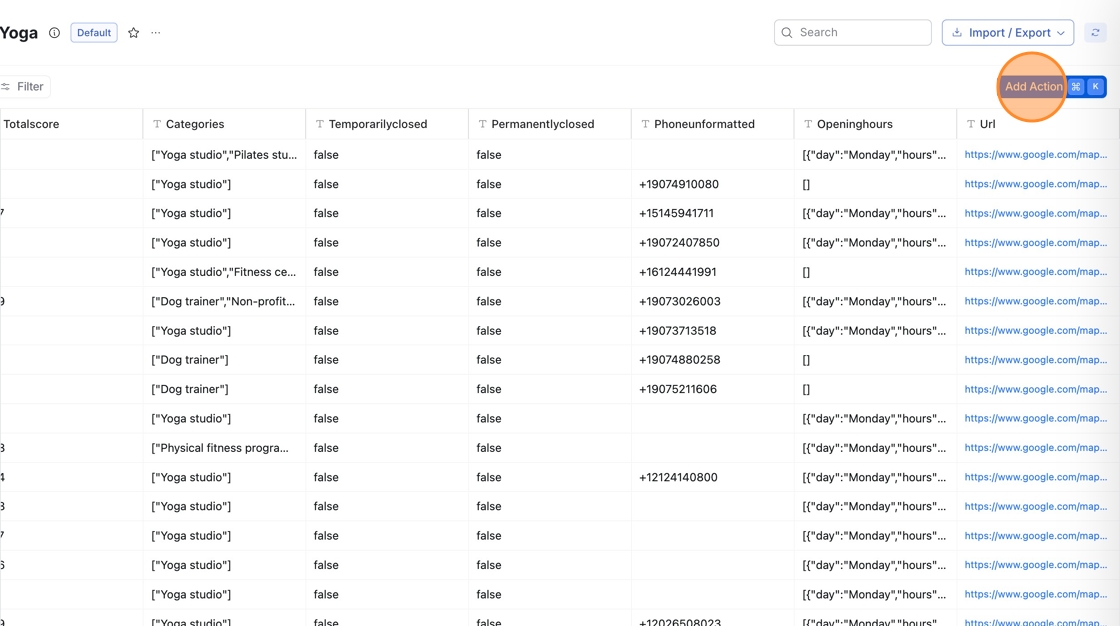
1. Go to your Workflow Table, then click 'Add Action'

   <figure><img src="https://assets.usepylon.com/e6cde654-d0d4-45d5-9eee-34263ece997e%2F1756404514315-HowtoCheckifBusinessWebsiteisActiveinWorkflows-Step0.png?Expires=253370764800&#x26;Signature=pPxumqHwtndOzUt75aeh72h3lIqLENjPOYMthr9EAOizsDZlye41uuacGoPZ-Qn7AHIYxPIa7tbiT0qSpguKezlzRCoVAAgHkTTm4dhYjd7s84nScmkazQPZc7HKJv9tpFPvBt73s6KzjhpvoQ~FAkoEoAktElYYBnXN5j3doIgtbkh98v2tnxQWGVfrYNc6MV7BRWj1UhGVTjhnpiKEP4gUIl1ECy-vClsO4mkJM5uXzhg12C1tJ1asdf13oC4ml9Robrd66sm08LF9Usjx-x~tu~MMcLm60uDT4tAwrvgeoRsTscT7a9CFlPXD-jzb9xO7z2RKKxI0qQqu1awH3w__&#x26;Key-Pair-Id=K3NV4LZ47N8M46" alt=""><figcaption></figcaption></figure>
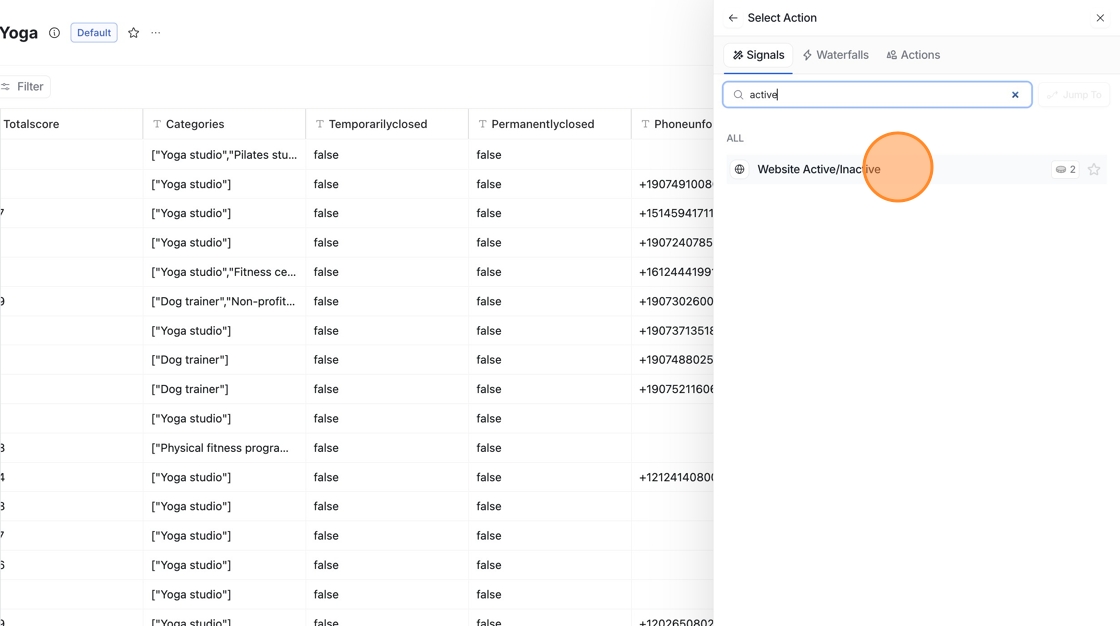
2. Search "Website Active/Inactive" under Signals

   <figure><img src="https://assets.usepylon.com/e6cde654-d0d4-45d5-9eee-34263ece997e%2F1756404533829-HowtoCheckifBusinessWebsiteisActiveinWorkflows-Step1.png?Expires=253370764800&#x26;Signature=pE5O8fSLVi1cd1hGCmMa1bNf0YcV5z3HUBYdXPqNrviPlZqj0aG1tDDLDETMGPY4vNMc7flbRKtvqicB2wyUZAOYHVc15imu5PU5iQSC~HPANoi3uODYARNkHob-nyDHBMCEcF0YGWynXllVEh5Lrcy8gI~Z9TqBN~5g4j6JAv7s4Kjq0G~Yvk4hq4h33~H9RFRBtpux5dcychoQ7yKxCrMh5MmFIJcyFpD4GtRTKnnpO0BF23H6JXZFEl2ZYdO1tbvIJr5nB4Rmb7uqCF1M~iK41dMhfvU4tDTapezLwtxUyUSvEfHatkLH4G-5c5gxjJ4dHKnPU22G2VIIHxWyEg__&#x26;Key-Pair-Id=K3NV4LZ47N8M46" alt=""><figcaption></figcaption></figure>

3. Type **/Domain** in the mapping field to link the action to your  URL column

   <figure><img src="https://assets.usepylon.com/e6cde654-d0d4-45d5-9eee-34263ece997e%2F1756404550225-HowtoCheckifBusinessWebsiteisActiveinWorkflows-Step2.webp?Expires=253370764800&#x26;Signature=FWF1q6Zy7bT0YQ6k3~jqNsB8WrECRZ9QiyEu4Q18kafPLBaXNvaXxgvbg6rjYWVRA1IKJsxm6za~gd0Xd9whH7aUMLXgBPC-fy13Ok-Gbz5vM6~lM5Dx5-i2zjoOIjwpZeb6mMqsuIO1N0vu5rT8~CV9gldIueGnAw72X-J5xdYxUo~BK8NY4Z7UITfFsLJyorYNHoigVwxzp1UjZYYRFPI0zvVHkd1aLVOZ6izBMWFNiLZAp-fEbjGKkaDen1TQlzs6zozP9SA9x3mF2Z6qsSJrumR4EBd10G7P0rjChao2gVUUKfyhyHvckMiCuvgZ1quFUSLPxhbw2DFcBdDGKw__&#x26;Key-Pair-Id=K3NV4LZ47N8M46" alt=""><figcaption></figcaption></figure>
4. Click Save, then choose to Run all rows or just Run 10 rows to test the action on a sample set before applying it to the full table:<br>

   <figure><img src="/files/YY1wRieNGsGTD0wXdXnD" alt=""><figcaption></figcaption></figure>

***

#### 🎥 Quick Video Walkthrough <a href="#quick-video-walkthrough-8" id="quick-video-walkthrough-8"></a>

Watch this quick video to see how you can use the 'Business Website Active / Inactive’ Agents:

{% embed url="<https://www.loom.com/share/2e5abd7f94e74513838c6a0454dff19a?sid=94b2977b-6a22-4af8-96f3-b7ff94b3db12>" %}