> For the complete documentation index, see [llms.txt](https://docs.withorbital.com/llms.txt). Markdown versions of documentation pages are available by appending `.md` to page URLs; this page is available as [Markdown](https://docs.withorbital.com/basics/plays.md).
# Plays
Webhook-based Inbound AI Enrichments
## What are Webhooks?
Webhooks are user-defined HTTP callbacks that allow different systems to communicate with each other in real-time. When an event occurs in a source system, it sends an HTTP POST request to a predefined URL in the destination system, allowing for immediate data transfer and action.
***
## Webhooks for Inbound
Orbital webhook triggers are a way to initiate Orbital inbound workflows in real- time. When a webhook is triggered, it can activate a series of actions within Orbital, including:
* Data enrichments
* Customer engagements AI agent interactions
* Custom workflow processes
Orbital webhooks are highly scalable mechanisms designed to handle large volumes of real-time data processing. They enable synchronous operations, allowing you to process customer data and take action immediately as events occur in your other systems.
### Setting up Webhooks for Inbound
To configure a webhook in Orbital, follow these steps:
\
**1. Create a New Inbound Workflow**
* Log in to your Orbital account
* Navigate to the Inbound section
* Click on "Create New Inbound"
* Give your workflow a descriptive name
\
**2. Select Webhook as the Trigger Type**
* In the workflow editor, locate the trigger section
* Click on "Select Trigger"
* Choose "Webhook" from the available trigger types and edit Settings
* Define your webhook schema (see below)
* Configure any additional webhook settings if required
\
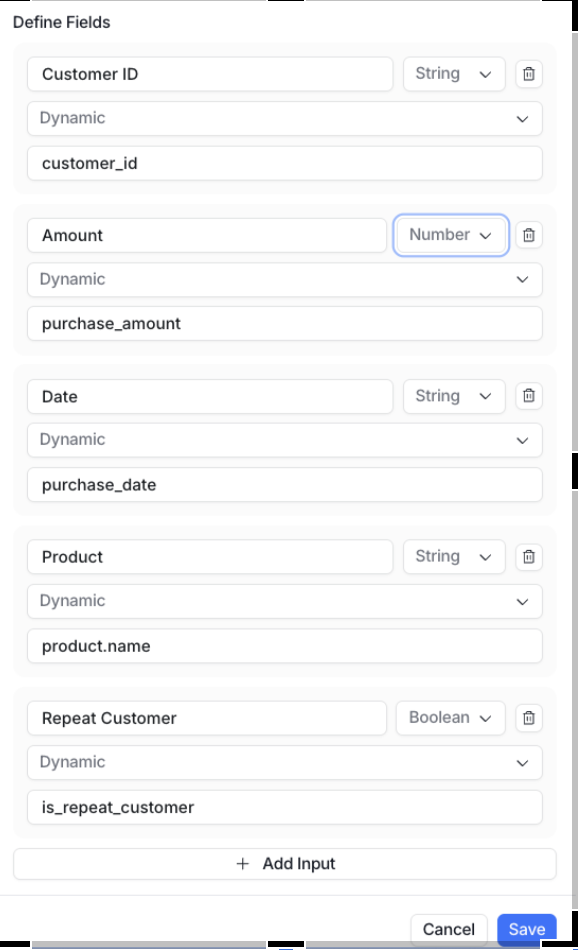
**3. Defining Your Webhook Schema**
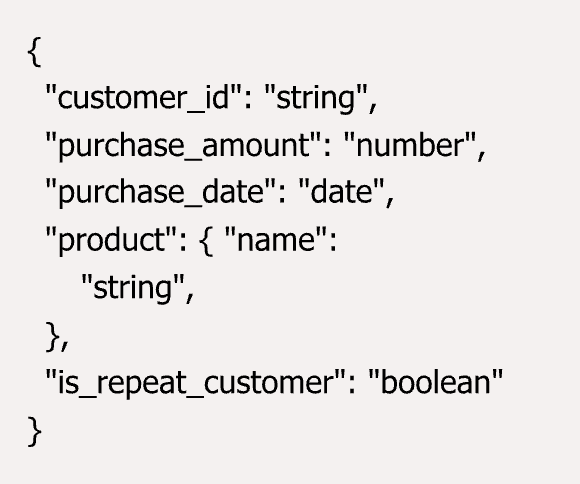
When setting up a webhook trigger, you must define the schema for the data you'll be sending:
* In the workflow trigger settings, define the expected JSON payload structure
* The schema can be nested, path to the field can be defined
* You can include as many fields as needed in your schema
* Each field should have a defined data type
You can modify your webhook schema at any time by returning to the workflow trigger settings\
\
**4.** **Activate the Webhook and Publish the Workflow**
* Configure the subsequent steps in your workflow (enrichments, engagements, AI agents, etc.)
* Review your complete workflow
* Click "Activate" to enable the webhook
* Publish your workflow by clicking "Publish"
**5.** **Obtain your Webhook URL**
After publishing the workflow, Orbital will generate a unique webhook URL for your workflow. This URL will be used to send data to Orbital and trigger your workflow.
* Locate the webhook URL in the workflow details
* Copy this URL to use in your source systems
The format will be: “app.withorbital.com/\/\ˮ
***
## Technical Implementation Details
### **Webhook URL Structure**
The webhook URL automatically identifies your:
* Orbital workspace
* Specific workflow
This means you don't need to include additional authentication parameters in your requests - the URL itself contains the necessary identification information
### **Security Considerations**
* **Treat the URL as a secret**: The webhook URL contains built-in authentication identifiers and should be treated like an API key. Store it securely and never share it publicly.
* **Access control**: Only share the webhook URL with systems and personnel that need to trigger the workflow
### **Protocol Requirements**
* **HTTPS only**: All webhook requests must be sent over HTTPS. HTTP requests will be rejected.
* **POST method**: Webhooks should be triggered using the HTTP POST method.
* **Content-Type header**: All requests must include the *Content-Type: application/json* header
* **JSON body**: The request body must be valid JSON format.
### **Request Format**
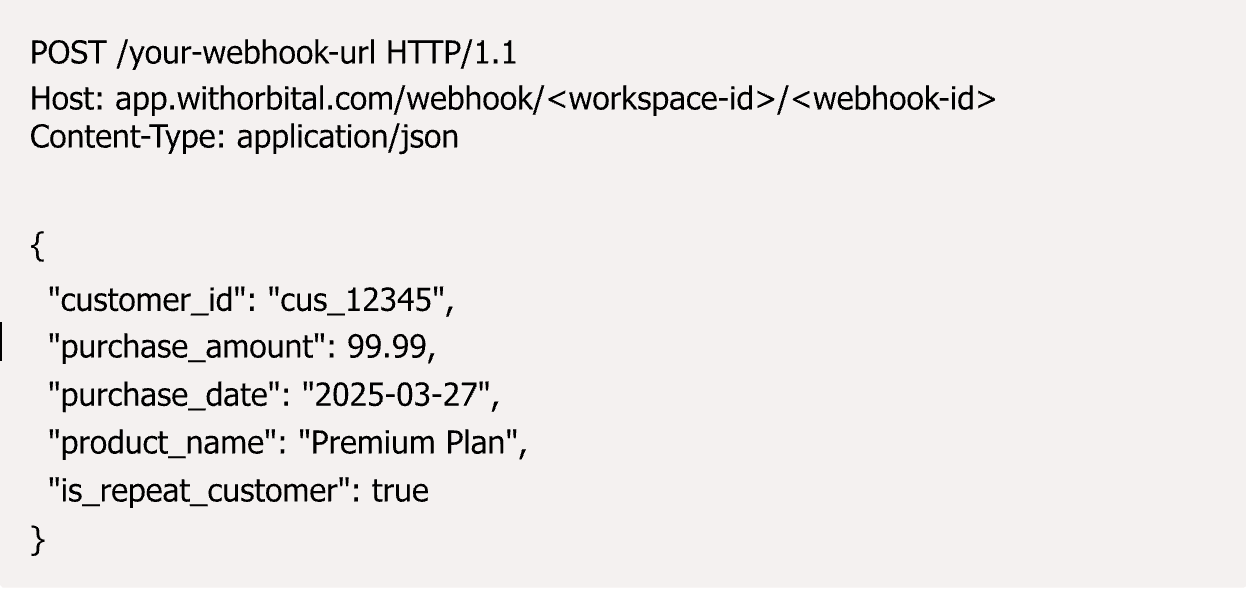
When triggering an Orbital webhook, send your data in the following format:
{% hint style="warning" %}
### **Important Payload Requirements**
* The JSON payload **must** exactly match the schema defined in your workflow trigger settings
* Nested JSON structures are not allowed - all values must be at the top level
* No additional keys or metadata should be included beyond what is defined in your schema
* Requests with payloads that don't match the defined schema will be rejected
{% endhint %}
### Response Handling
Orbital webhooks return standard HTTP status codes:
* **200 OK**: The webhook was successfully received and the workflow was triggered.
* **400 Bad Request**: The request was improperly formatted.
* **401 Unauthorized**: The webhook URL is invalid or has been deactivated.
* **429 Too Many Requests**: You've exceeded the rate limit for your workspace.
* **500 Internal Server Error**: An error occurred while processing the webhook.
### Parallel Processing and Workflow Execution
* **Parallel Processing**: Webhook requests can be triggered in parallel and will be processed asynchronously.
* **No Guaranteed Ordering**: The order of execution is not guaranteed when multiple webhooks are triggered simultaneously.
* **Monitoring Runs**: Once a workflow is triggered, you can monitor its execution in the Orbital dashboard under the "Runs" section.
### Rate Limiting
Webhook requests are subject to rate limits based on your workspace:
* Each workspace has a specific limit on the number of webhook requests allowed per minute
* Exceeding this limit will result in a 429 Too Many Requests response
* Consider implementing backoff and retry logic in your systems for rate limit handling
### Best Practices
* **Payload Structure**
* Keep your payload data structured and consistent
* Include only necessary data to optimize performance
* Use descriptive field names for easier mapping in Orbital workflows
* **Error Handling**
* Implement retry logic in your source systems
* Monitor webhook responses to ensure successful delivery Set up alerts for failed webhook deliveries
* **Testing**\
Before implementing a webhook in Production
* Test your webhook with sample data
* Verify the workflow behaves as expected
* Check that all downstream actions are correctly triggered
### Troubleshooting
Common Issues:
* **Webhook not triggering workflow**: Verify the workflow is published and the webhook is activated
* **Receiving error responses**: Check your payload format and ensure it matches the expected structure
* **Workflow not processing data**: Examine your workflow configuration for mapping errors